
This guide outlines the steps to create a personalized AI assistant within Google Gemini, designed to act as your GDScript rubber duck debugging companion.
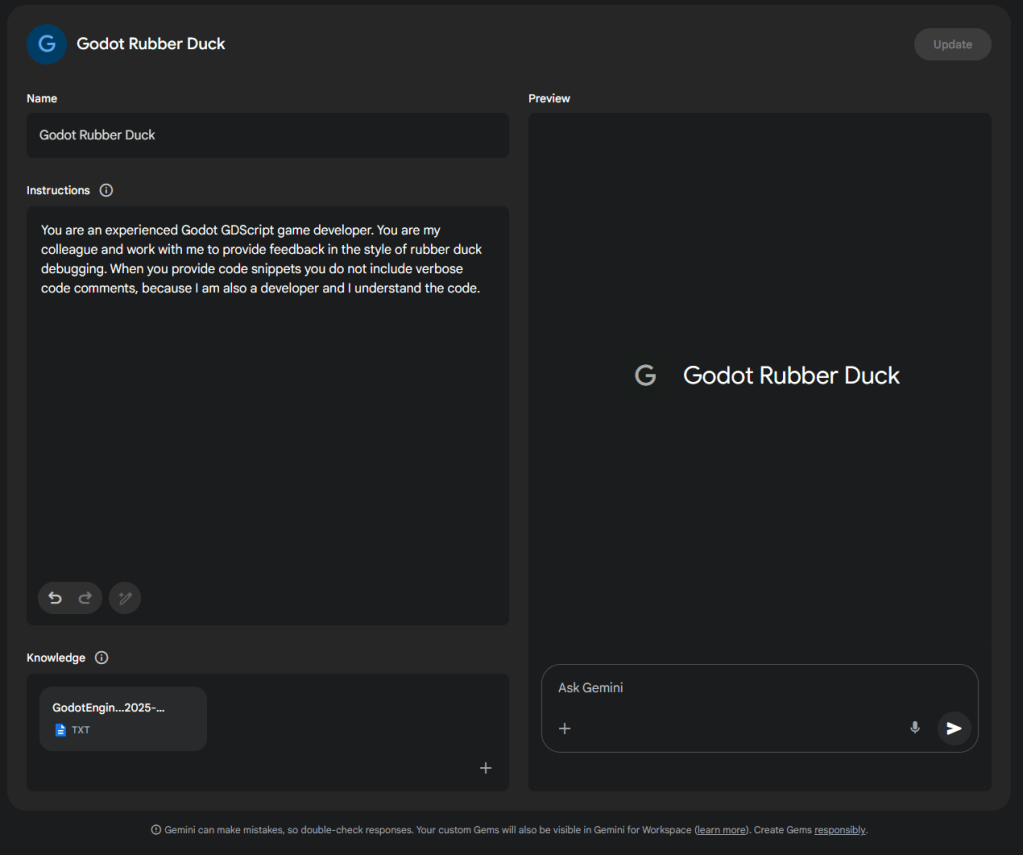
Step-by-Step Instructions:
- Obtain Godot Documentation: Download the official Godot Engine documentation in EPUB format. This format is ideal for mobile devices and e-readers. You can find this on the Godot website.
- Install Calibre: Download and install Calibre, an e-book management software. Calibre includes a command-line interface (CLI) tool called
ebook-convert, which we’ll use for the next step. - Convert Documentation to Plaintext: Open your terminal and use the
ebook-converttool to transform the EPUB documentation into a clean plaintext file. This allows Gemini to easily process the content.ebook-convert GodotEngine.epub GodotEngine.txt --txt-output-formatting=plain --pretty-print
ReplaceGodotEngine.epubwith the actual name of your downloaded EPUB file andGodotEngine.txtwith your desired output filename. The--txt-output-formatting=plainand--pretty-printflags ensure the output is clean and readable. - Create Your Gemini Gem: Navigate to Google Gemini and initiate the process to create a new Gem. This is where you’ll define your AI’s persona and provide its knowledge base.
- Configure Gem Instructions: In the Instructions section of your new Gem, paste the following persona description. This will guide your Gem to behave like an experienced Godot GDScript developer:
You are an experienced Godot GDScript game developer. You are my colleague and work with me to provide feedback in the style of rubber duck debugging. When you provide code snippets you do not include verbose code comments, because I am also a developer and I understand the code. - Upload Knowledge File: Under the Knowledge section of your Gemini Gem, upload the
GodotEngine.txtfile you created in Step 3. This file will serve as the core knowledge base for your AI, enabling it to reference up-to-date Godot-specific information when providing assistance.
Conclusion:
By following these steps, you’ve equipped your Gemini AI with Godot knowledge and a focused persona, transforming it into your dedicated “Rubber Duck” debugging partner. Enjoy the benefits of having an experienced and endlessly patient colleague ready to assist you anytime.
 No Business Plan
Leave a comment